
“Mid-dive my ELRS dropped LQ, OSD flashed low voltage, then failsafe. I have to Crash Flip the Quad to get of the Bando”
If that sentence makes zero sense - don’t worry.
By the end of this article, it will sound like poetry. 🎧
Welcome to the ultimate FPV Dictionary your all-in-one guide to understanding the language of drone pilots.
Whether you’re just unpacking your first transmitter or tuning PID profiles in Betaflight, this guide will help you make sense of all the mysterious abbreviations and slang flying around the FPV world.
We’ll cover everything from the hardware you can touch like gimbals, antennas, and modules to the software that runs behind the scenes, including protocols, firmware, link quality, and digital video systems like DJI O4 or Walksnail.
So buckle up, charge your LiPos, and let’s dive into the world where latency, rates, and RSSI are not just numbers, they’re the heartbeat of every FPV flight. 🏁
Radio Physical Components:
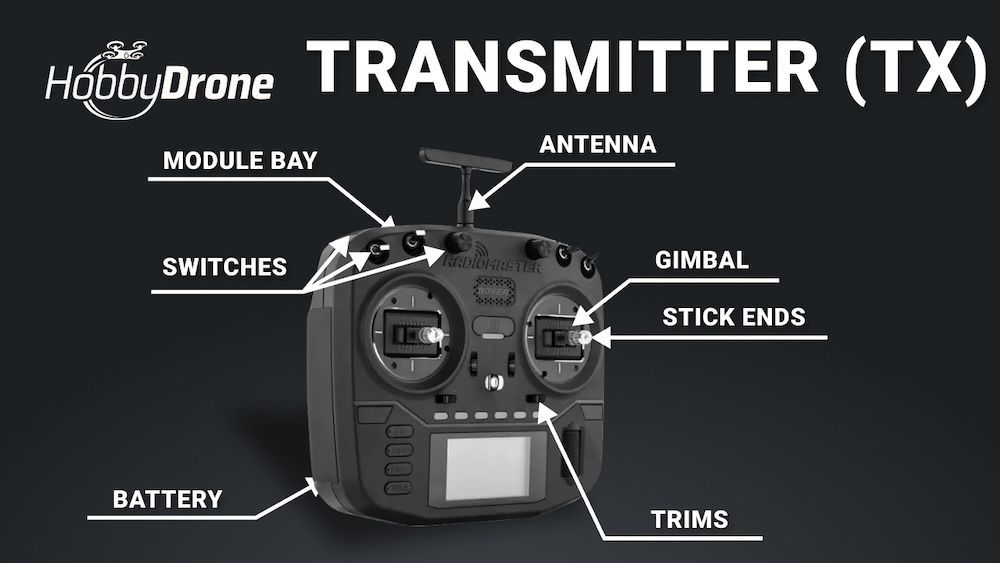 Before you even turn on your radio, it’s good to understand what all those switches, sticks, and ports actually do.
These are the physical parts of your transmitter - the things you can touch, adjust, or replace. From gimbals and stick ends to antennas and switches, each piece plays a key role in how precisely you control your drone.
🎮 Transmitter (TX)
Your FPV radio controller - the device you hold in your hands to control your drone. It sends your stick movements (throttle, roll, pitch, yaw) to the receiver on the drone.
📡 Receiver (RX)
A small device inside your drone that receives control signals from your transmitter. It tells the flight controller what you want the drone to do.
🗃️ Module Bay
A slot on the back of your transmitter where you can plug in an external RF module (like ELRS or Crossfire). It allows you to upgrade range or change the protocol easily.
🕹️ Gimbals
The joysticks on your transmitter. They detect your stick movements and translate them into drone motion. High-quality gimbals mean smoother and more precise control.
🎯 Stick Ends
The metal tips at the top of your gimbals that your fingers touch. They come in different shapes and textures for better grip - depending on whether you fly “thumb”, “pinch”, or “hybrid”.
🔘 Switches
Small toggle buttons or sliders on your transmitter used to trigger actions like arming, flight modes, or turtle mode. Each can be freely assigned in Betaflight or EdgeTX.
🪢 Radio Strap
A neck or chest strap that holds your transmitter securely while flying. Helps reduce hand fatigue and keeps your radio steady during long sessions.
🔋 Battery Type (TX Battery)
The power source for your transmitter, usually 2S or 3S Li-ion or LiPo packs. Choosing the right one ensures long flight sessions.
🔌 Charging Port (USB-C)
Used for charging your transmitter battery and often for updating firmware or connecting to simulators on your computer.
⚙️ Trims
Small adjustments on your transmitter that fine-tune the neutral position of your sticks.
They help keep your drone stable if it slightly drifts without input — though in FPV flying, trims are rarely used since stability is handled by the flight controller.
Radio Software & Internal Settings:
Not everything about your transmitter can be seen or touched - some of the most important features live inside.
Here we’ll explore the software side of your radio: protocols, firmware, link quality, and all the invisible systems that make your commands reach the drone smoothly and reliably.
⚡ Protocol
The language your transmitter and receiver use to communicate. Examples: ExpressLRS, Crossfire, or FrSky. Both TX and RX must use the same protocol to work together.
⚡ ELRS (ExpressLRS)
A modern, open-source long-range protocol for FPV radios. It offers ultra-low latency and strong signal performance - one of the most popular choices among FPV pilots today.
📡 Crossfire (TBS Crossfire)
A long-range radio system by Team BlackSheep (TBS). Known for excellent range and signal stability — great for long-distance or freestyle FPV flying.
🔧 FrSky
A popular FPV radio brand and protocol used mainly in older transmitters and receivers. Works well for beginners, though many pilots now switch to ExpressLRS.
⚡ Tracer
A high-speed radio protocol by Team BlackSheep (TBS). It offers very low latency and smooth control - ideal for racing, but with a shorter range than Crossfire.
👻 Ghost
A radio system by ImmersionRC designed for high performance and low latency. Popular among racers and freestyle pilots who want fast response and stable link quality.
💾 Firmware
The software that runs inside your transmitter or receiver (like EdgeTX or OpenTX). It controls all the radio’s functions and can be updated for new features.
🧠 EdgeTX / OpenTX
Open-source operating systems for FPV transmitters. They let you customize your radio layout, functions, and even interface design.
📶 Telemetry
Two-way communication that sends data from the drone back to your transmitter - such as battery voltage, signal strength (RSSI), or GPS info.
🔗 Bind / Pairing
The process of connecting your transmitter with your receiver so they recognize and communicate with each other. Usually done once per setup.
🚀 Range
The maximum distance your transmitter can communicate with your drone before losing signal. Depends on protocol, power output, and antenna type.
⚙️ Output Power
The strength of the radio signal your transmitter sends to the receiver. Higher power = longer range, but it also drains more battery and can cause overheating.
📶 Frequency
The radio band your system uses to communicate - most FPV transmitters use 2.4 GHz or 868/915 MHz (for long range). Both TX and RX must use the same frequency band.
📶 RSSI (Received Signal Strength Indicator)
Shows the strength of the radio signal between your transmitter and receiver. A low RSSI means you’re close to losing connection.
📡 LQ (Link Quality)
Measures the quality and reliability of the data link between TX and RX. Commonly used in ExpressLRS and Crossfire systems - higher is better.
🎮 Calibration
The process of adjusting your gimbals so they read movements accurately. Usually done in your radio’s settings after transport or maintenance.
💻 LUA Scripts
Small programmable tools inside EdgeTX/OpenTX that automate actions or communicate with your flight controller.
⚙️ Betaflight LUA Scripts
Mini programs that run on your transmitter, letting you adjust Betaflight settings directly - without needing to connect your drone to a PC.
📁 Model Profiles / Model Memory
Stored configuration profiles for each drone you fly. Each profile saves your channel mapping, switches, and settings separately.
🔧 Model Setup / Mixer Page
A menu inside your transmitter where you assign channels, functions, and switches (e.g. arming, flight modes, beeper).
📡 Antenna / SMA / RP-SMA
The connector type and antenna used on your transmitter or receiver. Choosing the correct type (SMA vs RP-SMA) ensures proper signal transmission and compatibility.
⚙️ Latency
The delay between moving your stick and the drone’s reaction. Lower latency means faster, more precise control - critical for racing and freestyle flying.
🧑🏫 Trainer Mode / Buddy Box
A feature that lets two transmitters connect together, so an instructor can take control if a student makes a mistake - perfect for learning.
Drone Physical Components:
🎥 Cinewhoop
A small, ducted FPV drone built for smooth cinematic flying. It’s safe to fly indoors or near people and perfect for capturing stabilized video in tight spaces.
🧱 Bumpers
Small protective parts on a drone frame, usually made of rubber or TPU. They absorb impacts during crashes and help prevent damage to motors, arms, or the frame itself.
🔌 XT60
A power connector used to link your drone’s battery to the power system. XT60 plugs are yellow, sturdy, and standard for most FPV builds — designed to handle high current safely.
Drone Software & Internal Settings
🎛️ Rates
Your sensitivity settings - they define how fast the drone reacts to your stick movements. Higher rates mean faster spins and flips; lower rates mean smoother control.